
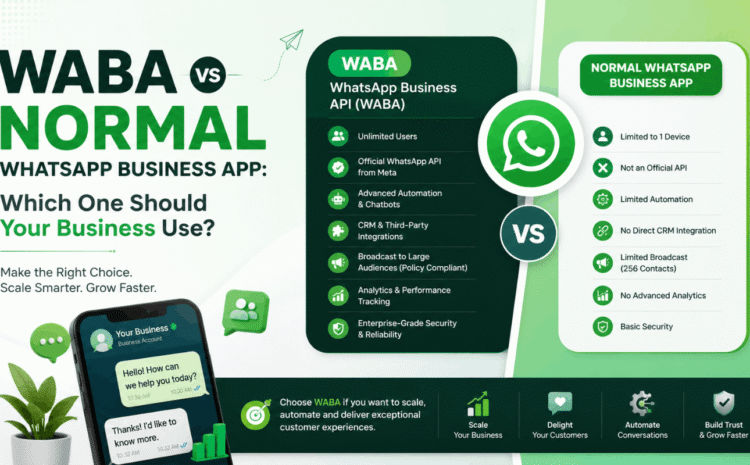
WABA vs Normal WhatsApp Business App: Which One Should Your Business Use?
With over 3 billion monthly active users globally, WhatsApp is no longer just a personal chat app—it is the dominant commercial communication infrastructure for modern enterprises. Whether a customer is asking about product pricing, requesting a site visit, or confirming an order, they expect immediate, personalized responses directly inside their primary messaging feed.
However, when business owners decide to leverage WhatsApp for commercial operations, they immediately encounter a fundamental question: Should we use the free, Normal WhatsApp Business App or upgrade to WABA (WhatsApp Business API / WhatsApp Business Platform)?
While both platforms share the same core green icon and end-user messaging interface, their underlying architectures, operational limits, and scaling capabilities are vastly different. Choosing the wrong version can severely bottleneck your customer support team, restrict your marketing reach, or even result in an unexpected account ban.
This comprehensive 2026 comparison guide breaks down every technical and financial difference between WABA and the Normal WhatsApp Business App, helping you choose the right solution for your business growth.
Defining the Two Tiers: App vs. API Platform
To make an informed choice, you must understand how Meta structures its commercial tiers.
[NORMAL WHATSAPP BUSINESS APP] [WABA / CLOUD API]
- Free download from Play Store/App Store • Enterprise Cloud Infrastructure (Meta)
- Installed on a single mobile device • No mobile app UI (Requires Software/BSP)
- Capped at 256 broadcast contacts • Unlimited broadcast reach to opt-in users
- Basic quick replies & away messages • Advanced AI chatbots & WhatsApp Flows
- Max 5 linked devices (1 phone + 4 tabs) • Unlimited concurrent human agents
The Normal WhatsApp Business App (SME Tier)
The Normal WhatsApp Business App is a free smartphone application downloadable from the Google Play Store or Apple App Store. Designed specifically for micro-enterprises, freelancers, and local retail stores, it introduces basic business features—such as a verified-style profile, a product catalog, quick replies, and manual chat labels—built on top of a single mobile number.
WABA (WhatsApp Business API / Platform Tier)
WABA (WhatsApp Business API), often referred to as the Cloud API or WhatsApp Business Platform, is Meta’s enterprise-grade programmable interface. Unlike the standard app, WABA has no standalone mobile app user interface. Instead, it connects directly to Meta’s secure cloud servers, allowing businesses to hook WhatsApp into dedicated multi-agent dashboards, custom CRM systems, AI-powered chatbots, and automated marketing tools.
Head-to-Head Comparison: WABA vs Normal WhatsApp Business App
To give you clarity at a glance, here is how both tiers compare across core operational metrics:
| Operational Feature | Normal WhatsApp Business App | WABA (WhatsApp Business API) |
| Primary Target Audience | Micro-businesses, local shops, solo founders | Growing SMBs, mid-market, and enterprise brands |
| Pricing | 100% Free | Software platform fee + Meta conversation charges |
| User Access / Team Scale | 1 Phone + up to 4 web tabs (Max 5 users) | Unlimited concurrent agents on 1 number |
| Broadcast Limit | Max 256 contacts per list (Recipient must save your number) | Unlimited opt-in broadcasts (No phonebook saving required) |
| Automation Capabilities | Basic away messages, greetings, and quick replies | AI Chatbots, native WhatsApp Flows, automated CRM triggers |
| Third-Party Integrations | None (Isolated phone sandbox) | Full Webhook / REST API sync (Shopify, CRM, ERP, Billing) |
| Official Green Tick | Not available | Eligible for official Meta Green Tick verification |
| Account Ban Risk | High if sending bulk messages to unsaved numbers | Zero ban risk when using Meta-approved templates |
| In-Chat Payment Links | Basic manual link pasting | Dynamic UPI / Stripe / Razorpay native checkout |
| Performance Analytics | Basic counts (Sent, Delivered, Read) | Deep agent metrics, response velocity, broadcast CTR |
Deep Dive: 5 Critical Operational Vectors Compared
Pillar 1: Broadcast Reach and Spam Ban Protection
The single biggest point of failure for growing businesses using the free Business App is broadcast marketing.
- The Normal App Trap: The free app limits broadcast lists to 256 contacts. Crucially, Meta enforces a strict policy: your broadcast message will only be delivered if the customer has actively saved your phone number in their contact list. If you attempt to circumvent this by using unofficial bulk-sender scripts or blasting unsaved numbers, Meta’s anti-spam algorithms will permanently ban your phone number.
- The WABA Advantage: WABA eliminates phonebook dependencies completely. You can send pre-approved template broadcasts to thousands of opted-in customers simultaneously. Messages land reliably in the user’s main chat inbox regardless of whether they have saved your number, maintaining a 100% compliant, ban-free operation.
Pillar 2: Multi-Agent Collaboration and Shared Team Inbox
As your inbound chat volume scales beyond 20 to 30 inquiries a day, managing customer service on a single mobile phone creates severe operational bottlenecks.
- The Normal App Limitation: The free app allows one primary phone and up to 4 linked browser sessions. There is no way to assign chats to specific department representatives, add internal staff notes, or track individual agent response times. Customers frequently experience double replies or missed inquiries.
- The WABA Solution: WABA routes all inbound messages into a centralized Shared Team Inbox. Dozens or even hundreds of human support agents can handle inquiries concurrently using the same official WhatsApp number. Team managers can assign chats automatically based on round-robin logic, view live performance analytics, and supervise conversation quality in real time.
Pillar 3: Automation Depth and Conversational Flows
Customer expectations in 2026 demand instant 24/7 engagement.
[Customer Query] ➔ [WABA AI Chatbot] ➔ [Qualifies Lead] ➔ [Launches Native WhatsApp Flow] ➔ [Instant Booking / Order Sync]
- The Normal App Constraint: Automation in the basic app is strictly reactive—limited to simple greeting messages, out-of-office notifications, and manual quick-reply shortcuts. It cannot evaluate complex customer intent, parse data, or guide a user through a structured booking journey.
- The WABA Standard: WABA empowers you to build full-scale AI Chatbots and native WhatsApp Flows. Customers can view interactive appointment forms, select product variants from interactive catalog menus, calculate price quotes, and complete transactions entirely within the WhatsApp chat thread without visiting an external website.
Pillar 4: Ecosystem & CRM Integration
Isolated communication channels slow down operational productivity.
- The Normal App Sandbox: The free application sits completely isolated on your mobile device. If a customer buys an item or requests an invoice, an employee must manually copy-paste details between WhatsApp and your backend billing or CRM systems.
- The WABA Connected Ecosystem: WABA connects seamlessly via webhooks and REST APIs to platforms like Shopify, Salesforce, HubSpot, Zoho, Petpooja, and custom enterprise databases. This allows you to set up automated workflow triggers, such as:
- Sending an instant WhatsApp invoice the moment a transaction is completed.
- Triggering automated abandoned cart reminders within 15 minutes of site drop-off.
- Dispatching real-time delivery tracking links and post-purchase feedback requests.
Pillar 5: Brand Credibility and the Verified Green Tick
Trust is the most valuable currency in online sales.
- Normal App Credentials: Displays a standard business profile with a basic phone number. When messaging unsaved contacts, your phone number appears instead of your official company name, often making users hesitant to engage.
- WABA Credentials: WABA accounts are eligible to apply for Meta’s official Verified Green Tick Badge. Once verified, your official brand name displays prominently at the top of the chat thread—even if the user has never saved your number—instantly building trust and boosting message open rates.
Financial Breakdown: Free vs Transactional Value
Understanding the true cost structure of both platforms is essential for accurate budgeting.
The Normal WhatsApp Business App: ₹0 / $0
The standard app is 100% free to download and operate. You only pay for your standard mobile data plan. While this zero-cost barrier is ideal for micro-businesses, the hidden cost lies in lost sales leads, manual labor hours, and potential revenue penalties caused by account bans.
WABA Cost Components
WABA operates on a scalable, pay-as-you-grow model consisting of two main elements:
- BSP / Platform Subscription Fee: Charged by official Business Solution Providers (BSPs) to give you access to shared inboxes, chatbot builders, broadcast engines, and CRM integrations. Plans typically start around ₹1,199 to ₹1,500/month for growing businesses.
- Meta Category-Based Conversation Fees: Meta bills per 24-hour conversation window based on the category of message sent:
- Marketing Conversations: Outbound promotional offers, product catalog drops, and back-in-stock alerts (~₹1.09 per delivery in India).
- Utility Conversations: Order confirmations, delivery updates, and automated receipts (~₹0.11 to ₹0.14 per delivery).
- Authentication Conversations: Secure One-Time Passwords (OTPs) and verification codes.
- Service Conversations (Customer Care): 100% FREE! Whenever a customer initiates a chat with your business, all replies sent within a 24-hour window carry zero Meta message charges.
- The 72-Hour Free Window: All user-initiated conversations originating from Click-to-WhatsApp Facebook or Instagram Ads are exempt from Meta delivery fees for 3 full days!
Decision Matrix: Which One Should Your Business Use?
┌─────────────────────────────────────────┐
│ DECISION TREE GUIDELINE │
└────────────────────┬────────────────────┘
│
Are you receiving more than 30–50 chats/day,
or do you have a team of 2+ support agents?
│
┌────────────┴────────────┐
│ │
YES NO
│ │
▼ ▼
[ UPGRADE TO WABA ] [ STICK TO NORMAL APP ]
- Unlimited Reach • Zero Software Cost
- Shared Team Inbox • Ideal for Local Stores
- Chatbots & CRM Sync • Manual 1-on-1 Contact
Stick to the Normal WhatsApp Business App if:
- You are a solo entrepreneur, local neighborhood store, freelancer, or home consultant.
- You handle fewer than 20 to 30 customer conversations per day.
- You do not run paid digital ad campaigns or outbound marketing broadcasts to large databases.
- A single smartphone is sufficient to manage all your customer contacts.
Upgrade to WABA (WhatsApp Business API) if:
- You receive more than 50 inbound chats or leads daily.
- You have 2 or more team members who need to handle support or sales chats concurrently from a single number.
- You want to send outbound broadcast campaigns to lists larger than 256 contacts without risking a number ban.
- You need to automate lead qualification, abandoned cart recovery, or appointment booking using AI chatbots.
- You want to integrate WhatsApp directly with your e-commerce platform (Shopify, WooCommerce) or sales CRM.
How to Migrate from the Normal App to WABA Seamlessly
Transitioning to WABA does not mean losing your established business identity. You can migrate your existing phone number directly to the official WABA platform in a few simple steps:
- Backup Your Local Chats: Save your existing conversation history inside the standard mobile app interface.
- Delete the Standard WhatsApp Account: Navigate to App Settings ➔ Account ➔ Delete Account (this unlinks the phone number from Meta’s consumer server nodes, freeing it up for API migration).
- Choose an Official WABA Provider: Partner with an official Meta BSP or platform provider.
- Complete Meta Business Manager Verification: Submit basic legal business documents (GST Certificate, FSSAI license, or incorporation papers) to verify your company identity.
- Activate Your Shared Team Inbox: Authenticate your number via a fast SMS OTP, connect your CRM webhooks, and launch your automated workflows!
FAQs: WABA vs Normal WhatsApp Business App
1. What does WABA stand for?
WABA stands for WhatsApp Business API (also known as the WhatsApp Business Platform or Cloud API). It is Meta’s enterprise messaging infrastructure designed for scalable automation and team collaboration.
2. Is the Normal WhatsApp Business App completely free to use?
Yes, the basic WhatsApp Business App is 100% free to download and use on Android and iOS devices.
3. Why is there a 256-contact limit on the Normal WhatsApp Business App?
Meta caps broadcast lists at 256 contacts per list on the standard app to prevent commercial spam and protect private consumer experiences.
4. Can I send broadcasts to unsaved phone numbers using WABA?
Yes! WABA allows you to send pre-approved template messages to any opted-in customer, regardless of whether they have saved your contact number in their phonebook.
5. Will my number get banned if I use WABA for bulk marketing?
No. Because WABA uses Meta-approved templates and official Cloud API channels, your account operates with zero risk of automated anti-spam bans as long as you maintain good quality scores.
6. Can multiple employees use the same WABA phone number on different computers?
Yes! WABA supports unlimited concurrent human agents accessing a single business number via a shared multi-agent inbox dashboard.
7. Can I build an AI chatbot on the Normal WhatsApp Business App?
No. The standard app only supports basic away messages, greeting notes, and manual quick replies. Advanced, multi-step AI chatbots require WABA.
8. How do I get the official Green Tick verification badge on WhatsApp?
The Green Tick is exclusively available to verified business accounts operating on the official WhatsApp Business API (WABA). Standard app accounts cannot receive green tick verification.
9. an I connect WABA to my Shopify store for automated order updates?
Yes! WABA easily integrates with Shopify, WooCommerce, and custom checkout platforms to trigger automated order confirmations, shipping updates, and abandoned cart reminders.
10. What happens when a customer messages my WABA account first?
When a customer initiates a chat, it creates a Service Conversation. All replies sent by your business or automated chatbot within a 24-hour window carry zero Meta delivery charges.
11. Do I need coding skills to setup and manage WABA?
No! Modern Business Solution Platforms offer user-friendly, no-code visual workflow builders and ready-made shared inbox interfaces.
12. Can I run Click-to-WhatsApp ads with the Normal WhatsApp Business App?
Yes, you can link basic Click-to-WhatsApp ads to the standard app. However, upgrading to WABA allows you to launch instant interactive WhatsApp Flows and qualify leads automatically the moment they click your ad.
13. What is a WhatsApp Flow?
A WhatsApp Flow is an interactive, native form that opens directly inside the chat thread, allowing users to choose dates, select options, or fill out surveys without leaving WhatsApp.
14. Can I keep my existing phone number when moving from the App to WABA?
Yes, you can migrate your existing business phone number to WABA after deleting the account profile on the mobile app.
15. What documents are required for Meta WABA business verification?
You need standard official registration documents that match your legal business name, such as a GST Certificate, Udyam MSME certificate, FSSAI license, or Incorporation papers.
16. How fast does it take to activate a WABA account?
With modern Embedded Signup flows, official WABA access can be activated in as little as 10 to 15 minutes.
17. How does WABA handle customer payments?
WABA enables native dynamic payment links (such as UPI, Razorpay, or Stripe), allowing customers to complete purchases seamlessly within the chat thread.
18. What is the 72-Hour Free Window for Meta Click-to-WhatsApp Ads?
When a user opens a chat by clicking a Click-to-WhatsApp ad on Facebook or Instagram, Meta waives all conversation charges for that user interaction for 72 hours.
Conclusion: Choose the Scale That Fits Your Ambition
Choosing between the Normal WhatsApp Business App and WABA comes down to one core factor: your scale of operations. If you are a local merchant or solo business owner managing a handful of direct relationships, the free app offers a quick, accessible starting point.
However, if your ambition is to build a fast-growing, multi-agent sales machine, run high-ROI broadcast campaigns, eliminate lead drop-offs with AI automation, and protect your brand from phone number bans, upgrading to WABA is the definitive choice for 2026.
Disclaimer & Action Guide
All platform features, Meta conversation categories, delivery pricing structures, and verification policies reflect official Meta developer updates and industry benchmarks for the 2026 calendar year. Actual return on investment, lead conversion velocity, and broadcast performance depend on creative content quality, opt-in compliance, and offer alignment.
Ready to Scale Your Business Communication Beyond Limits?
Don’t let single-phone bottlenecks or 256-contact limits slow down your revenue potential. Upgrade your business to the official Meta WhatsApp Business API platform today. Book an exclusive live demo and strategic consultation on our website to access instant Embedded Signup, visual chatbot builders, multi-agent team inboxes, and seamless CRM integrations.