
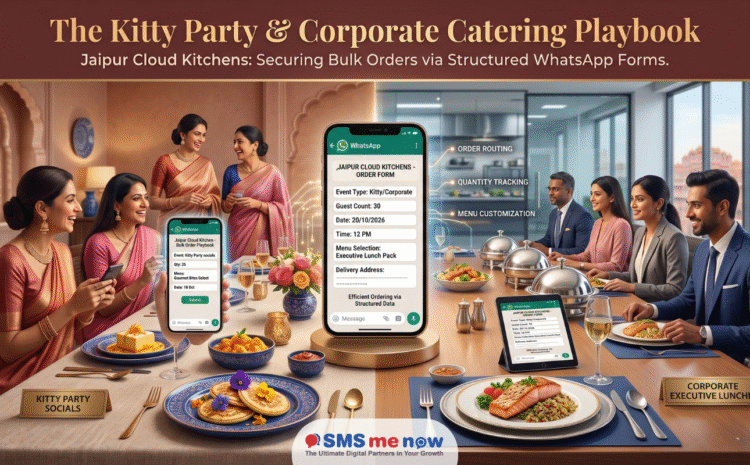
The Kitty Party & Corporate Catering Playbook: How Jaipur Cloud Kitchens Secure Bulk Orders via Structured WhatsApp Forms
WhatsApp Catering Order Management Jaipur, Jaipur’s culinary landscape is undergoing a massive structural shift. While dine-in restaurants in C-Scheme and rooftop lounges in Malviya Nagar continue to thrive, the real volume game is being played behind closed doors. High-margin, massive-volume bulk catering has emerged as the holy grail for local food tech entrepreneurs.
In a city defined by its vibrant social fabric, two distinct sub-sectors drive non-stop bulk demand: The corporate hub expansion (across Sitapura Industrial Area, Mansarovar, and the Mahindra World City SEZ) and premium high-frequency social gatherings (like localized Kitty Parties in Vaishali Nagar, Raja Park, and Bani Park).
However, cloud kitchens face an operational bottleneck: managing bulk orders through traditional channels is chaotic. A consumer organizing a 30-guest kitty party or a HR manager coordinating a 150-pax corporate lunch does not want to fill out complicated, heavy website forms, nor do they want to toggle back and forth across endless, unorganized text messages detailing menu alterations.
To bridge this friction gap and scale seamlessly, Jaipur’s top-performing cloud kitchens are deploying Official WhatsApp Business API (WABA) Services integrated with Native WhatsApp Flows (Structured Forms). By capturing complex catering parameters directly within the chat app, local food brands are streamlining operations, eliminating manual order entry errors, and securing lucrative high-volume bookings.
The Chaos of Unstructured Bulk Ordering: Why Phone Calls and Standard Chats Fail
For a standard cloud kitchen, a bulk order is a operational high-wire act. Unlike a single-portion order of Butter Chicken and Naan, a catering request for a corporate event or a kitty party involves dozens of critical variables.
When managed over standard phone calls, unverified personal WhatsApp groups, or rigid website links, things often break down:
- The Communication Void: A client messages their food preferences, but forgets to specify exact spice tolerances, Jain food alternatives, or precise cutoff delivery times. The ensuing back-and-forth delays the quote, giving rival kitchens time to step in.
- The Clipboard Nightmare: Kitchen managers manually transcribe item sheets, quantities, and delivery addresses from loose chat logs onto paper clipboards. A single misread digit can lead to a corporate lunch arriving without plates or a kitty party receiving the wrong dessert.
- The Payment Friction: Taking partial advance token deposits to clear raw material procurement requires sending unlinked bank details or loose UPI screenshots, which adds friction and increases the risk of last-minute cancellations.
By transitioning to structured WhatsApp Forms (Flows), the entire process—from primary inquiry and dish allocation to automated dynamic price configuration and advanced billing settlement—is completed inside a single, secure conversational thread.
Inside the Playbook: How Native WhatsApp Flows Structure the Order
A WhatsApp Flow is an advanced, form-based guided interface that opens natively as a secure, sleek overlay window inside the standard WhatsApp chat feed. The client completes a structured multi-page form with dropdowns, calendar picks, and selection boxes without ever exiting the chat app to open a mobile browser.
The 45-Second Catering Customization Journey
[Click Promotion Link] ➔ [Launch Native In-Chat Form] ➔ [Select Menu & Customize Parameters] ➔ [Instant Automated Invoice]
Screen 1: Event Mapping & Basics
The client initiates the interaction via a “Click-to-WhatsApp” Instagram ad or a QR code link on a corporate flyer. The chatbot greets them by name and presents a primary call-to-action button: [Customize Your Catering Menu]. Tapping this opens the native form layout.
- Event Type Dropdown: [Corporate Lunch / Kitty Party / Birthday / High-Tea]
- Guest Headcount Counter: [Numerical Input: e.g., 45 Guests]
- Date & Precise Delivery Window: Built-in calendar picker and time slot matrix.
Screen 2: Dynamic Menu Selection & Customization
The interface moves to the menu configuration layer, pulling real-time item categories from the cloud kitchen’s centralized database:
- Starters & Mocktails: Multi-select check-boxes for appetizers (“Paneer Tikka, Corn Cheese Balls, Mint Mojitos”).
- Mains Customization: Interactive options to select specific gravy bases, bread arrays, or traditional Rajasthani items (“Dal Baati Churma, Gatte ki Sabji”).
- Dietary Tagging Toggle: Dropdown inputs to flag exact quantities for specialized dietary requests (“Standard Vegetarian: 35 | Pure Jain (No Onion/Garlic): 10”).
Screen 3: Logistics Coordination & Location Pinning
Instead of typing out confusing street directions for expansive residential zones like Mansarovar or commercial lanes in Sitapura, the user drops a precise location pin using WhatsApp’s native mapping system. The form also prompts the selection of service styles:
- Delivery Method: [Self-Pickup / Standard Boxed Delivery / Full Chafing-Dish Live Counter Setup]
Localized Scenarios: Tailoring to Jaipur’s Unique Demographics
Scenario A: The Premium Corporate Boardroom Lunch (Sitapura & Mahindra World City)
- The Persona: An administrative officer or HR executive tasked with ordering an upscale lunch box setup for a high-profile executive assembly.
- The Pain Point: Needs formal corporate compliance, exact billing delivery tracking, and clean individual packaging.
- The WABA Automation: The structured form collects the company’s official GSTIN number directly within the workflow. The moment the order is locked, the API triggers an automated Utility Template delivering a pristine, GST-compliant PDF invoice straight to their chat history, making accounting approvals simple.
Scenario B: The Luxury Residential Kitty Party (Vaishali Nagar & Raja Park)
- The Persona: A design-conscious lifestyle host organizing an elegant thematic afternoon high-tea or lunch for 25 close friends.
- The Pain Point: Demands absolute flexibility in changing dish variations, high-end presentation, and prompt delivery before the guests arrive.
- The WABA Automation: The form focuses heavily on visual presentation, allowing the user to swipe through carousel cards displaying beautifully arranged platters. It also automates a post-event satisfaction check, inviting them to share a direct Google Business review via a simple tap 4 hours after delivery.
The Data Matrix: Comparing Operational Performance
Shifting bulk order processing from unstructured messaging streams to automated, form-driven conversational workflows creates distinct improvements across all core metrics:
| Operational Metric | Unstructured Chat & Manual Calls | WABA Integrated Flows & Automation |
| Form Completion Rate | ~23% (When redirected to website links) | 78% (Native, In-App Form Submission) |
| Order Processing Time | 45 to 60 Minutes (Back-and-forth messaging) | Under 3 Minutes (Structured End-to-End) |
| Menu Entry Errors | 8% to 12% (Garbled texts, manual typos) | 0% (Direct CRM/Kitchen KOT Mapping) |
| Last-Minute Cancellations | 18% (Soft holds with zero commitment) | Under 1% (Due to Automated Deposit Collection) |
| Repeat Ordering Rate (LTV) | ~14% (No automated follow-ups) | 42% (Driven by Personalized Broadcasts) |
FAQs: Scaling Cloud Kitchen Bulk Orders via WABA Platforms
1. Do users need to install an external browser extension or app to view the catering form?
No. WhatsApp Flows operate natively as a sleek overlay interface within the standard WhatsApp app that clients use daily.
2. How does the system calculate total pricing for varying guest counts?
The backend system uses calculation fields linked to the form. As the customer increases the guest count or adds premium dishes, the total invoice updates in real time.
3. Can we collect advance payments through the WhatsApp chat window?
Yes. By integrating local payment gateways (like Razorpay, Paytm, or Cashfree), the chatbot can present a direct UPI deep-link button, allowing users to process partial token deposits instantly.
4. How do these bulk orders print inside the cloud kitchen?
The API links via webhooks to popular restaurant POS systems like Petpooja or Posist, printing a structured Kitchen Order Ticket (KOT) automatically at the preparation line.
5. Can the system accommodate late-stage changes to the guest count?
Yes. You can configure a secondary template option, such as [Modify Existing Order], which allows clients to update their headcounts up to 24 hours before the event.
6. What is the 72-hour free messaging window benefit?
If a client enters your WhatsApp thread by clicking a Meta “Click-to-WhatsApp” ad, all messages exchanged with that customer for the next 72 hours are completely exempt from Meta delivery fees.
7. Can a single WhatsApp number handle 50 people filling out forms simultaneously?
Yes. The official enterprise Cloud API operates on robust server networks, allowing thousands of simultaneous form submissions without lag.
8. What official business paperwork is required to set up a WABA account?
You need an active business registration matching your Meta Business Manager profile, such as a GST Certificate or an FSSAI License.
9. How long does it take for Meta to approve a new catering template form?
Most automated structure checks are completed by Meta’s compliance algorithms within 5 to 30 minutes.
10. Can we offer custom live-counter setups through the form menu?
Yes. The logistics screen can include optional add-ons like “Include Live Pasta Station” or “Add Mocktail Bartender,” updating the final quote automatically.
11. How do we handle international cards for corporate clients visiting Jaipur?
Integrated payment gateways support international credit cards, processing currency conversions smoothly within the payment step.
12. Can we send video previews of our kitchen’s hygiene practices?
Yes. The welcome sequence can include rich-media attachments, such as high-definition videos showing your kitchen’s clean cooking standards.
13. What happens if a customer has a complex custom request not listed on the form?
The form includes a text input field for special requests, and the bot can instantly route the conversation to a human manager via a live team dashboard if needed.
14. How long can a cloud kitchen store customer data for future campaigns?
The data is stored securely in your connected CRM indefinitely, allowing you to run safe, compliance-aligned seasonal menus or festive offers.
15. Does WABA require any telecom DLT registration like old-school SMS text blasts?
No. WABA bypasses traditional telecom DLT registration entirely, making setup and template management much simpler.
Conclusion: Future-Proofing Bulk Food Commerce
For Jaipur’s growing cloud kitchen sector, scaling up your bulk order volume requires making the booking process as effortless as possible for your clients. By replacing disorganized phone logs and slow web links with automated WhatsApp Catering Order Management, your kitchen can capture high-value orders instantly, eliminate manual errors, and build a highly organized, predictable stream of catering revenue.
Disclaimer & Action Guide
All base conversation fees, delivery metrics, and platform regulatory benchmarks reflect Meta’s official global framework rules for the 2026 calendar year. Net conversion figures, lead acquisition costs, and individual kitchen processing metrics vary based on specific geographical menu pricing, local delivery fleet setups, and database targeting quality.
Stop Losing High-Value Catering Bookings to Manual Chaos!
Streamline your bulk ordering pipeline, eliminate communication errors, and scale your kitchen’s catering revenue with a custom conversational order management system built for Jaipur’s top food brands. Book a live demo and strategy consultation through our official website today to access direct POS plug-ins, custom menu form builders, and exclusive entry volume packaging.