
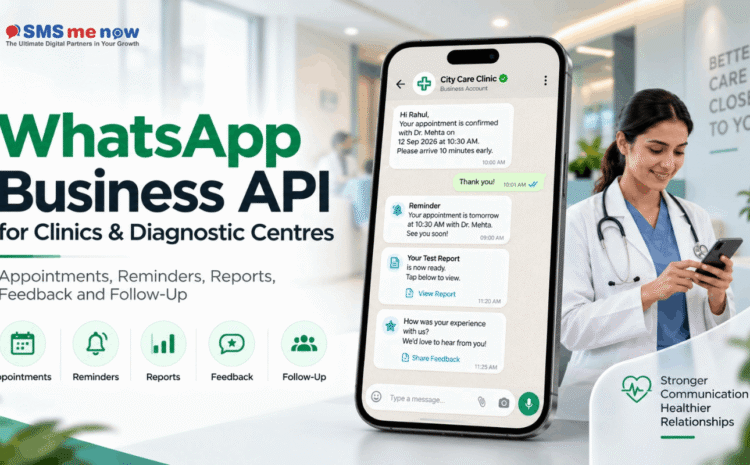
WhatsApp Business API for Clinics & Diagnostic Centres: Appointments, Reminders, Reports, Feedback and Follow-Ups
Immediate Response
WABA can be used in clinics and diagnostic centers to facilitate operational communications involving appointment bookings, confirmations, reminders, locations, reports, and feedback. The best way to do this is by ensuring that sensitive information related to medical translation and advice remains with professionals.
The WhatsApp Business API for Clinics & Diagnostic Centers: Appointments, Reminders, Reports, Feedback, and Follow-Ups is a key business topic, as the communication and marketing platforms are right within the customer journey. Today, businesses do not select their platforms based on the capacity for messaging and calls anymore; they decide which tools will help capture leads, respond instantly, respect customer preferences and evaluate results.
This guide is dedicated to using WhatsApp Business API for healthcare. It shows where this technology is beneficial, where the most common errors are made by businesses while using it, how to introduce it gradually and what should be measured after implementation. The objective is not to clutter the conversation with technical terms and codes but to provide owners and marketing/operations teams with a framework that will work in practice.
Importance of the Topic to Business in 2026
• Healthcare communication requires high levels of urgency and heightened privacy compared to general retail communication.
• The patient will need information regarding timings, preparations, location, appointment status, and availability of reports on a frequent basis.
• Business workflow may help in reducing the work load at reception and missed appointments without making the chatbot into an adviser.
• Confidentiality and security policies of the organization should govern sensitive information or identifiers rather than using WhatsApp due to convenience.
• There is a necessity for human escalation with regard to symptoms, interpretation of medicine, complains, and emergencies.
Design Principles for an Effective WhatsApp Business Workflow
• Since WhatsApp is meant to be a customer journey, it shouldn’t be thought of as a replacement for mass unsolicited messaging. The company needs to understand the reason behind the customers being on the channel and what information the customers need to proceed and hand the responsibility over to a human.
• Effective template governance is important. Ensure you have a well-managed library of templates based on purpose, owner, audience, approval status and last review date so that older and duplicate templates don’t remain a nuisance.
• Quality of opt-ins impacts business performance as well as the customer experience. Having a relevant permission-based audience makes automation valuable because the company will then be able to personalise their interactions on the basis of lifecycle and intention.
• When integrating any system into the chat platform, the company needs to send only that data which is required to complete the task.
Practical Workflow
• Learn about the clinic, department, or test needed without requesting unnecessary personal information about the health of the individual.
• Provide possible appointment options or refer the request to reception.
• Communicate the confirmation, address, and acceptable preparation details.
• Give reminders about the visit at an appropriate time.
• Inform the patient of their report readiness through the approved means by the organization.
• Prompt for service feedback without revealing any clinical data.
Use Cases for Business Purposes
• A diagnostic centre can automate the fasting test instructions when the appointment is confirmed.
• A multi-specialty clinic can direct appointment requests to the right department and clinic.
• A laboratory can inform the patient about report readiness along with a secure portal link instead of sending confidential reports to everyone.
Metrics to Track
• Measure appointment conversion. Clearly define how this metric is measured and by whom so that the reporting process will be consistent between campaigns and teams.
• Measure no-show rate. Clearly define how this metric is measured and by whom so that the reporting process will be consistent between campaigns and teams.
• Measure reception response time. Clearly define how this metric is measured and by whom so that the reporting process will be consistent between campaigns and teams.
• Measure reduction in repeat calls. Clearly define how this metric is measured and by whom so that the reporting process will be consistent between campaigns and teams.
• Measure feedback form completion. Clearly define how this metric is measured and by whom so that the reporting process will be consistent between campaigns and teams.
• Measure human escalation rate. Clearly define how this metric is measured and by whom so that the reporting process will be consistent between campaigns and teams.
Common Mistakes That Need to Be Avoided
• Avoid the use of the bot for the diagnosis of symptoms as this will result in unnecessary costs or poor experience of the customer.
• Avoid the collection of too much health data in the chat process as this will lead to unnecessary costs, poor customer experience or compliance issues.
• Avoid the issuance of reports without proper access controls in place as this will lead to unnecessary costs, poor customer experience or poor compliance.
• Avoid failing to offer emergency guidance or escalation as this will lead to unnecessary costs, poor customer experience or poor compliance.
• Avoid the use of marketing campaigns without proper consent as this will lead to unnecessary costs, poor customer experience or poor compliance.
Implementation Checklist
• First start with one journey where there is some visible manual effort or lag time in responses. Capture current messages, actors, and customer decisions in process before choosing automation capabilities.
• Specify the opt-in source, categories of templates, human handoff, operating hours and escalations before building the smallest possible workflow that will solve your problem.
• Automate CRM only when you have ownership and duplicate handling strategies in place. Else the automation will result in more data management than any benefits.
• Pilot with one team or customer base first. Examine chat history, template effectiveness and human handoffs before increasing your number of messages.
• Create a monthly review process for templates, knowledge base information, pricing/policies and platform changes.
30-Day Action Plan
- Week 1 – Discovery: export a sample of customer interactions, determine reasons for customer interaction and identify the journeys with the highest delays, repeats and/or lack of follow-ups. Confirm the opt-in source and the human teams responsible for each of those journeys.
- Week 2 – Design: develop the approved message copy, questions, hand-off process, and CRM field rules. Start with the very narrow first version, so the team knows exactly what kind of customer issue it addresses.
- Week 3 – Pilot: launch in one team, branch or customer segment. Observe live conversations daily, find the sources of customer confusion and validate that agents get enough information about customers when taking over from the automation.
- Week 4 – Optimization: strip down extra steps, refine the templates, make audience targeting stricter and benchmark response rates, conversions and costs against the pre-launch performance. Document the process before moving on to other journeys.
- After 30 days, decide to scale or not depending on customer result and team efficiency, not just the volume of messages and percent of conversations automated. It is much better to have a solid small workflow than a large vulnerable bot.
Frequently Asked Questions (FAQs)
1. Can clinics make appointments using WABA?
Yes. Appointment discovery, booking requests, confirmations and reminders would be great use cases.
2. Can a bot give medical advice?
A generic business bot should not be considered an alternative to a professional clinical opinion. Escalate your medical queries properly.
3. Can diagnoses be shared via WhatsApp?
Your organisation’s policies about security and privacy should be respected. Consider a report-ready notification with access to it rather than attaching it.
4. Can WABA decrease no-shows?
Timely confirmations and reminders can remind patients about their appointments, although success varies.
5. Can several branches use the same workflow?
Yes. You can select branch and department during routing.
6. Can the patients reschedule via WhatsApp?
The process can handle rescheduling if it is linked to the scheduling system or the receptionists.
7. What kind of data should the chatbot collect?
The data that is needed only for the administrative procedure. Do not request sensitive information just because you can collect it.
8. Can we send marketing messages to the patients?
Marketing messages need proper consent and review of the policies, especially when it comes to sensitive industries.
9. What will happen if the patient has a question that needs an urgent response?
The process should address such questions in case of any.
10. What should be automated in a clinic first?
Appointment confirmations, directions, and reminders since they are repetitive and safe to measure.
Conclusion
A WhatsApp Business API for Healthcare is a way to add value to businesses when implemented based on real customer journey, ownership and accountability. The most effective implementation begins with identifying the right problem, selecting the right channel for the right job and improving based on the performance data. To discuss how this applies to you, visit SMSNow.in or SMS Me Now. We provide bulk SMS, voice, WhatsApp Business API, web and digital marketing solutions that can be tailored to fit your business needs.
| Plan your business communication or marketing workflow with SMS Me Now. Visit SMSNow.in or contact the team to discuss the most suitable setup for your business. |
Disclaimer
The article serves a general information and marketing planning purpose. The features of the platform, the cost, legal requirements, availability and technical capabilities may vary. Make sure you check the latest and most accurate information before proceeding to use it.