
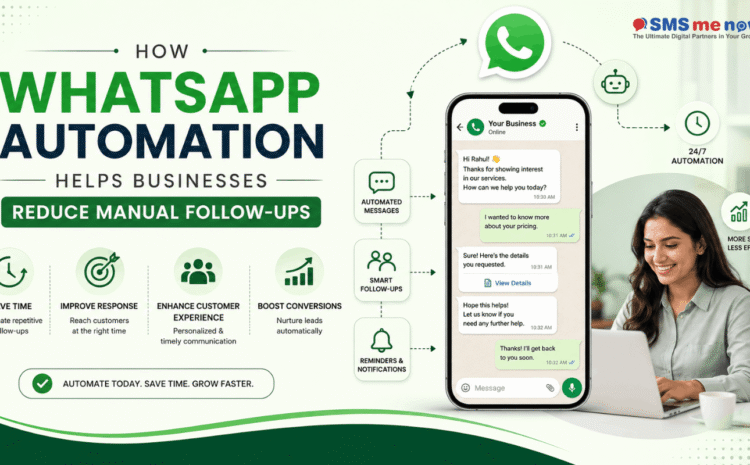
How WhatsApp Automation Helps Businesses Reduce Manual Follow-Ups
Quick Answer: How Does WhatsApp Automation Reduce Manual Follow-Ups?
WhatsApp automation helps businesses reduce manual follow-ups by automatically sending reminders, lead-nurturing messages, appointment confirmations, payment notifications, order updates and customer-support responses based on predefined triggers.
Instead of requiring sales or support teams to remember every follow-up manually, automated workflows can send the right message at the right stage of the customer journey.
For example, if a lead asks for a quotation but does not respond for two days, the system can automatically send a follow-up message. If a customer books an appointment, WhatsApp automation can send a confirmation immediately and a reminder before the appointment.
This allows employees to focus on conversations that genuinely require human attention.
Introduction
Following up with leads and customers is one of the most important activities in sales, marketing and customer service.
However, it is also one of the most repetitive.
Sales teams often need to:
- Follow up with new enquiries
- Remind customers about quotations
- Check whether prospects need more information
- Confirm appointments
- Share payment reminders
- Send order updates
- Ask customers for documents
- Follow up after demonstrations
- Reconnect with inactive leads
- Request customer feedback
When these tasks are handled manually, employees have to remember who should be contacted, when the next message should be sent and what information should be included.
As enquiry volumes increase, this approach becomes difficult to manage.
Some leads may receive multiple follow-ups while others may receive none. Employees may forget to contact high-intent prospects, and valuable opportunities may be lost simply because the team was busy.
This is where WhatsApp Automation for Business Follow-Ups becomes useful.
By connecting WhatsApp with a CRM, website, chatbot or business software, companies can create automated communication workflows that respond to specific customer actions.
Automation does not mean replacing human communication completely. Instead, it removes repetitive work so employees can spend more time on meaningful sales discussions, problem solving and relationship building.
What Is WhatsApp Automation?
WhatsApp automation is the process of using software, APIs, chatbots, CRM systems and predefined workflows to send or manage WhatsApp messages automatically.
An automated action may be triggered when:
- A new lead submits an enquiry
- A customer sends a particular message
- An appointment is booked
- A quotation is shared
- A payment becomes due
- A customer does not respond
- An order changes status
- A support ticket is created
- A subscription is about to expire
- A lead reaches a specific CRM stage
The system can then send a relevant message or assign the conversation to an employee.
What Are Manual Follow-Ups?
Manual follow-ups are messages or calls that employees personally send after reviewing customer records.
For example, a sales executive may maintain an Excel sheet containing:
- Customer name
- Mobile number
- Product interest
- Last contact date
- Next follow-up date
- Current status
Every morning, the employee checks the sheet and sends WhatsApp messages individually.
This may work when a company handles only a few leads.
However, once the company receives dozens or hundreds of enquiries every day, manual follow-up becomes difficult to control.
Problems With Manual Follow-Ups
1. Leads Can Be Forgotten
An employee may intend to call a prospect after two days but forget because of meetings, new enquiries or other work.
Even one missed high-intent lead can mean lost revenue.
2. Follow-Ups May Be Delayed
Customers often expect quick responses.
If a prospect requests pricing today but receives a follow-up several days later, they may already have selected another provider.
3. Repetitive Work Consumes Employee Time
Employees may repeatedly send similar messages such as:
“Have you reviewed our quotation?”
“Would you like to schedule a demo?”
“Your payment is due tomorrow.”
These messages can often be automated.
4. Inconsistent Communication
One employee may follow up after one day while another waits a week.
Without a standard workflow, customer experience becomes inconsistent.
5. Lead Tracking Becomes Difficult
Manual conversations may be scattered between:
- Personal phones
- Spreadsheets
- CRM notes
- WhatsApp chats
- Internal messages
Management may not know which leads are pending.
6. Human Errors Increase
Employees can accidentally:
- Contact the wrong person
- Send duplicate messages
- Forget a follow-up
- Share outdated information
- Miss an appointment
- Contact a converted customer unnecessarily
Automation reduces these repetitive errors.
How WhatsApp Automation Reduces Manual Follow-Ups
1. Instant Response to New Leads
A new enquiry should ideally receive an immediate acknowledgment.
Instead of requiring an employee to manually reply, automation can send:
“Thank you for contacting us. We have received your enquiry. Please select the service you are interested in.”
Options can include:
- Website Development
- Digital Marketing
- Software Development
- Product Enquiry
- Talk to Our Team
The system begins qualification before a salesperson becomes involved.
2. Automated Lead Qualification
Not every enquiry requires immediate human attention.
A WhatsApp chatbot can ask:
- Which service are you interested in?
- What is your location?
- What is your approximate budget?
- When do you plan to start?
- Would you like a quotation or consultation?
The answers can be saved in the CRM.
The sales team receives a more complete lead instead of manually asking the same questions repeatedly.
Example Automated Lead Flow
A typical lead automation workflow may look like:
Advertisement / Website Enquiry
↓
Automatic WhatsApp Welcome Message
↓
Lead Qualification Questions
↓
CRM Lead Created
↓
Relevant Brochure or Information Shared
↓
Salesperson Assigned
↓
Automatic Follow-Up if No Response
↓
Appointment / Demo Booking
↓
Reminder Message
↓
Sales Conversation
↓
Converted or Future Follow-Up
This workflow significantly reduces repetitive manual communication.
3. Automatic Follow-Up After No Response
One of the most valuable automation use cases is following up with leads who stop responding.
Suppose a prospect receives a quotation but does not reply.
A workflow may be configured like this:
After 24 Hours
“Hello, just checking whether you had a chance to review the quotation we shared. Let us know if you have any questions.”
After 3 Days
“Would you like our team to explain the pricing or recommend a suitable option?”
After 7 Days
“We are keeping your enquiry open. Reply anytime if you would like to continue the discussion.”
The exact communication schedule should depend on the business, customer permission and current messaging policies.
4. Automated Appointment Reminders
Businesses that depend on appointments can automate reminders.
This is useful for:
- Hospitals
- Clinics
- Salons
- Real-estate companies
- Consultants
- Coaching institutes
- Training centres
- Service businesses
Example
When a customer books an appointment:
Immediately:
Booking confirmation is sent.
One Day Before:
Reminder is sent automatically.
Two Hours Before:
Final reminder may be triggered.
Employees do not need to contact every customer manually.
5. Automated Payment Reminders
Payment collection is another area where businesses spend significant time on follow-ups.
Automation can send reminders for:
- Subscription renewals
- Pending invoices
- Course fees
- Service payments
- Installments
- Maintenance charges
- Booking amounts
Example Workflow
7 Days Before Due Date:
Friendly reminder
1 Day Before Due Date:
Upcoming payment notification
Due Date:
Payment reminder
After Due Date:
Overdue notification
Once payment is received, the system should stop further reminder messages automatically.
6. Quotation Follow-Up Automation
Many sales leads disappear after receiving pricing.
WhatsApp automation can help maintain communication without requiring salespeople to monitor each quotation manually.
The workflow can track:
- Quotation sent
- Quotation viewed
- Customer response
- Follow-up due
- Negotiation stage
- Converted
- Lost
If no response is received, a predefined follow-up can be triggered.
High-value leads can then be assigned to sales representatives for personal attention.
7. Order and Delivery Updates
E-commerce and product businesses can automate:
- Order confirmation
- Payment confirmation
- Packing update
- Shipment notification
- Delivery tracking
- Delivery confirmation
- Feedback request
This reduces customer-service queries such as:
“Has my order shipped?”
“When will my order arrive?”
“Has my payment been received?”
8. Automated Document Reminders
Many businesses require customers to submit documents.
Examples include:
- Financial services
- Insurance
- Education
- Real estate
- Recruitment
- Legal services
- Loan applications
Instead of manually checking each application, the system can send reminders for missing documents.
Example:
“We still need your address proof to complete your application. Please upload the required document through the secure link.”
9. Subscription and Renewal Follow-Ups
Subscription-based businesses can create automated renewal journeys.
The customer can receive notifications:
- 30 days before expiry
- 15 days before expiry
- 7 days before expiry
- On expiry date
Businesses that can benefit include:
- SaaS companies
- Hosting providers
- Gyms
- Training institutes
- Maintenance services
- Insurance providers
- Membership businesses
Automation reduces the chance of losing customers simply because nobody remembered to contact them.
10. Customer Feedback Automation
Businesses can automatically ask for feedback after:
- Product delivery
- Appointment completion
- Service completion
- Course completion
- Support resolution
- Hotel checkout
Example
“Thank you for choosing our service. How would you rate your experience?”
Buttons:
- Excellent
- Good
- Average
- Need Support
Negative responses can automatically create a support task for an employee.
WhatsApp Automation With CRM Integration
Automation becomes more powerful when WhatsApp is connected with a CRM.
The CRM can store:
- Customer name
- Phone number
- Lead source
- Product interest
- Assigned employee
- Last conversation
- Lead stage
- Next follow-up
- Quotation status
- Payment status
- Appointment status
- Conversion value
Automation rules can then be created according to CRM stages.
Example
If:
Lead Stage = Quotation Sent
and
No Response = 48 Hours
then:
Send WhatsApp Follow-Up
If the customer replies, the automation pauses and the conversation is assigned to the salesperson.
WhatsApp Automation Examples by Industry
Real Estate
Automate:
- Property enquiry response
- Price sharing
- Site-visit booking
- Visit reminders
- Quotation follow-up
- Project updates
Healthcare
Automate:
- Appointment confirmations
- Appointment reminders
- Follow-up consultation reminders
- Report availability alerts
Sensitive medical information should be handled carefully and according to applicable privacy requirements.
Education
Automate:
- Admission enquiries
- Counselling reminders
- Fee reminders
- Class updates
- Attendance alerts
- Application follow-ups
E-Commerce
Automate:
- Order confirmation
- Delivery updates
- Cart follow-ups
- Product recommendations
- Feedback requests
B2B Services
Automate:
- Lead qualification
- Demo scheduling
- Proposal follow-ups
- Contract reminders
- Renewal reminders
Major Benefits of WhatsApp Automation
Saves Employee Time
Repetitive follow-up messages no longer need to be sent individually.
Improves Response Speed
Customers receive important information faster.
Reduces Missed Opportunities
Automated reminders ensure that leads are not forgotten.
Creates Consistent Communication
Every lead follows the same properly planned journey.
Helps Sales Teams Prioritize
Employees can focus on qualified and high-value opportunities.
Improves Customer Experience
Customers receive relevant updates without repeatedly contacting the business.
Supports Business Growth
Automation allows companies to manage larger enquiry volumes without increasing manual work at the same rate.
Improves Data Visibility
CRM integration allows management to track the complete customer journey.
Reduces Human Error
Automatic triggers reduce forgotten follow-ups and duplicate messages.
Supports 24/7 Initial Communication
Automated greetings and basic qualification can work even outside office hours.
Best Practices for WhatsApp Follow-Up Automation
To get better results:
- Keep messages short and useful.
- Personalize messages where appropriate.
- Avoid excessive follow-ups.
- Clearly identify the business.
- Provide an option to talk to a person.
- Stop automation when a customer replies.
- Stop sales reminders after conversion.
- Respect opt-out requests.
- Maintain customer consent records.
- Segment leads before sending follow-ups.
- Connect automation with CRM stages.
- Review workflows regularly.
- Protect customer information.
- Test automation before launch.
Automation Should Not Completely Replace Humans
A common mistake is trying to automate every conversation.
Automation works best for predictable tasks.
Use automation for:
- Greetings
- FAQs
- Lead qualification
- Appointment reminders
- Payment reminders
- Order updates
- Routine follow-ups
Use human employees for:
- Negotiations
- Custom quotations
- Complaints
- Complex technical questions
- Sensitive issues
- High-value sales
- Relationship management
The strongest approach is automation plus human support.
Important Metrics to Track
Businesses should measure:
- Number of automated conversations
- Lead response rate
- Follow-up response rate
- Qualified lead rate
- Appointment booking rate
- Sales conversion rate
- Average response time
- Number of manual follow-ups saved
- Customer opt-out rate
- Payment collection rate
- Renewal rate
- Cost per converted lead
These metrics help determine whether automation is actually improving business performance.
Frequently Asked Questions
1. What is WhatsApp automation for business?
WhatsApp automation uses software, APIs, chatbots and workflows to automatically send or manage business messages based on customer actions or predefined triggers.
2. How does WhatsApp automation reduce manual follow-ups?
It automatically sends reminders, lead-nurturing messages, appointment notifications, payment alerts and other routine communications, reducing the need for employees to send every message manually.
3. Can WhatsApp automatically follow up with leads?
Yes. A workflow can send follow-up messages when a lead has not responded within a defined period, provided the communication follows current WhatsApp policies and customer-consent requirements.
4. Can WhatsApp automation integrate with a CRM?
Yes. WhatsApp automation can be connected with compatible CRM systems to store leads, update stages, assign employees and trigger follow-up workflows.
5. Can businesses automate appointment reminders on WhatsApp?
Yes. Appointment confirmations and reminders can be triggered based on scheduled dates and times.
6. Can WhatsApp automation send payment reminders?
Yes. Businesses can automate invoice, installment, subscription and renewal reminders according to their billing system.
7. Can a human agent take over an automated WhatsApp chat?
Yes. A properly configured system can transfer conversations from a chatbot or automated workflow to an authorized employee.
8. Is WhatsApp automation suitable for small businesses?
Yes. Small businesses with repetitive enquiries or follow-up tasks may benefit from automation, although the required setup depends on enquiry volume and business complexity.
9. Which industries can use WhatsApp follow-up automation?
Real estate, education, healthcare, e-commerce, travel, professional services, automotive, finance, logistics, SaaS and many other industries can use automated WhatsApp communication.
10. How can a business start using WhatsApp automation?
The business should identify repetitive communication tasks, map customer journeys, prepare appropriate WhatsApp Business Platform access, connect relevant systems, configure workflows, test them and train employees before launch.
Conclusion
WhatsApp Automation for Business Follow-Ups can significantly reduce the repetitive communication workload faced by sales, marketing and customer-service teams.
Instead of employees manually remembering every follow-up, businesses can create workflows that automatically manage:
- New lead responses
- Lead qualification
- Quotation follow-ups
- Appointment reminders
- Payment notifications
- Customer feedback
This allows employees to focus on conversations where human expertise makes the biggest difference.
However, successful automation requires careful planning. Businesses should avoid sending excessive messages or creating complicated chatbot experiences.
The objective should be simple:
Automate repetitive communication while keeping important customer conversations personal.
When WhatsApp is properly connected with CRM systems, websites and business software, it can become an effective tool for reducing manual work, improving response consistency and helping teams manage more customers efficiently.
Automate Your Business Follow-Ups With WhatsApp
Stop spending valuable employee time manually reminding every lead and customer.
Book a consultation through our website to build a customized WhatsApp automation solution for your business.
Our team can help with:
- WhatsApp Business API integration
- Automated lead follow-ups
- WhatsApp chatbot development
- CRM integration
- Lead qualification workflows
- Appointment reminders
- Payment reminders
- Customer-support automation
- Sales automation
A properly planned WhatsApp automation system can help your business save time, manage more enquiries and ensure important follow-ups do not get missed.
Disclaimer
This article is intended for general informational and educational purposes only.
WhatsApp Business Platform features, pricing, message categories, template requirements, automation capabilities and platform policies may change over time.
Businesses should review the latest official WhatsApp and Meta documentation before launching automated messaging campaigns.
Organizations should also obtain appropriate customer consent, maintain communication preferences, protect customer data and follow applicable privacy, marketing and consumer-protection laws.
Automation results may vary depending on the business industry, lead quality, customer behaviour, messaging strategy, sales process, software integrations and implementation quality.
For a solution designed around your business requirements, customer journey and existing software, book a consultation through our website before implementing WhatsApp automation.