
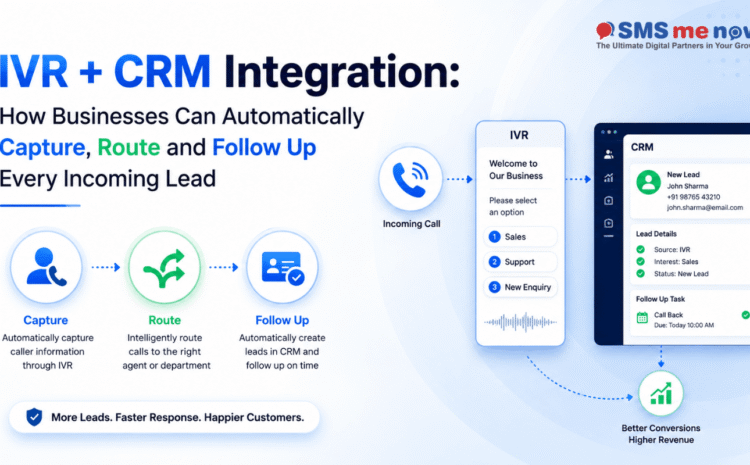
IVR + CRM Integration: How Businesses Can Automatically Capture, Route and Follow Up Every Incoming Lead
| Quick Answer IVR becomes much more valuable when call events are connected to CRM. Instead of treating a phone call as an isolated interaction, the business can create or match a lead, record the source and department, route it to the right agent, schedule follow-up and track the final outcome. This prevents missed calls from disappearing into personal call logs. |
IVR + CRM Integration: How Businesses Can Automatically Capture, Route and Follow Up Every Incoming Lead is an important business topic because communication and marketing systems now sit directly inside the customer journey. Businesses are no longer choosing tools only for sending messages or receiving calls; they are deciding how leads are captured, how quickly teams respond, how customer consent is respected and how outcomes are measured.
This guide focuses on IVR CRM integration from a practical 2026 perspective. It explains where the approach creates value, where businesses commonly make mistakes, how to implement it in stages and what to measure after launch. The goal is not to overload the discussion with code or platform jargon, but to give owners and marketing or operations teams a clear framework they can use when planning the service.
Why This Topic Matters for Businesses in 2026
- Many businesses invest heavily in ads but still receive calls on shared mobile numbers where no structured lead record is created.
- IVR can collect routing intent before an agent answers, while CRM preserves identity, ownership, notes and next action after the call.
- Missed calls are especially important because the caller has shown intent even though no conversation happened.
- Integration should avoid creating duplicate CRM leads every time an existing customer calls.
- The call system and CRM need a common identifier, timestamp and ownership logic so reporting remains trustworthy.
Principles for Customer-Friendly Call Automation
- Phone automation should reduce effort for callers, not prove how many menu options the system can support. Design around the customer’s top reasons for calling.
- Every transfer should preserve context. When callers repeat the same information to three agents, the routing technology is creating work rather than removing it.
- Missed calls need an owner and a response target. A sophisticated IVR is not useful if unhandled calls still disappear into a report nobody reviews.
- Measure the entire outcome—from call arrival through routing, human answer, CRM disposition and final conversion—rather than only total call minutes.
A Practical Workflow
- Receive the call on a central business number.
- Use a short IVR menu or routing rule to identify purpose, location or department.
- Search CRM for an existing contact before creating a new lead.
- Attach call metadata and assign the correct owner or queue.
- If the call is missed, trigger a callback task and an appropriate acknowledgement message.
- Record disposition and next follow-up after the agent completes the call.
Business Use Cases
- A real-estate company can route buyer and seller enquiries separately and assign the lead by project.
- A service centre can recognise an existing customer and route directly to support instead of sales.
- A multi-branch clinic can use location selection before creating an appointment callback task.
What to Measure
- Track answered-call rate. Define exactly how the metric is calculated and who reviews it so reporting remains consistent across campaigns and teams.
- Track missed-call callback time. Define exactly how the metric is calculated and who reviews it so reporting remains consistent across campaigns and teams.
- Track call-to-lead creation rate. Define exactly how the metric is calculated and who reviews it so reporting remains consistent across campaigns and teams.
- Track duplicate lead rate. Define exactly how the metric is calculated and who reviews it so reporting remains consistent across campaigns and teams.
- Track lead conversion. Define exactly how the metric is calculated and who reviews it so reporting remains consistent across campaigns and teams.
- Track first-call resolution. Define exactly how the metric is calculated and who reviews it so reporting remains consistent across campaigns and teams.
Common Mistakes to Avoid
- Avoid creating a new CRM lead for every repeat call. This usually creates either unnecessary cost, weak customer experience, poor reporting or compliance risk.
- Avoid designing a long IVR menu. This usually creates either unnecessary cost, weak customer experience, poor reporting or compliance risk.
- Avoid not defining who owns missed calls. This usually creates either unnecessary cost, weak customer experience, poor reporting or compliance risk.
- Avoid storing call outcome only in agent notes. This usually creates either unnecessary cost, weak customer experience, poor reporting or compliance risk.
- Avoid failing to connect marketing source with incoming number. This usually creates either unnecessary cost, weak customer experience, poor reporting or compliance risk.
Implementation Checklist
- Collect at least two weeks of call reasons and missed-call data before designing the menu. Real caller behaviour is more reliable than internal assumptions.
- Draft the shortest routing tree that handles the majority of calls and provides a clear path to a human or callback option.
- Connect call events to CRM or a lead queue with explicit ownership, duplicate matching and disposition fields.
- Pilot during business hours, monitor abandonment and transfers, then add after-hours and overflow rules once the main path is stable.
- Review menus whenever teams, branches, offers or working hours change. An outdated IVR silently sends good leads to the wrong place.
A 30-Day Action Plan
- Week 1 – Observe: review call logs, missed calls and common caller reasons. Speak with reception and sales teams to identify the transfers and repeated questions that waste the most caller and employee time.
- Week 2 – Prototype: create the shortest practical routing tree, define business hours, overflow and callback ownership, and map how a caller is matched to an existing CRM record or new lead.
- Week 3 – Pilot: route a controlled share of calls through the new flow and monitor abandonment, wrong transfers, repeat calls and missed-call follow-up. Keep a manual fallback available while the logic is still being validated.
- Week 4 – Refine: simplify menu wording, change timeouts, improve branch or department routing and make sure every unhandled call appears in an owned callback queue with a measurable response target.
- After the first month, expand only the flows that demonstrably reduce caller effort or improve lead recovery. The objective is a shorter path to resolution, not a more elaborate phone tree.
Frequently Asked Questions (FAQs)
1. What is IVR CRM integration?
It connects call-routing and call-event data with CRM so customer identity, lead ownership and follow-up can be managed in one workflow.
2. Can a missed call create a lead?
Yes. The system can create or match a record and generate a callback task when the workflow is configured for it.
3. Can existing customers be recognised?
If the caller number matches a CRM record, the system can use that context to avoid unnecessary duplicate records.
4. How many IVR menu levels should we use?
Keep menus as short as possible. Every extra layer increases caller effort and abandonment risk.
5. Can calls be assigned by city?
Yes. Routing can use IVR selection, DID number, branch logic or available CRM data.
6. Can a CRM show call history?
Integration can store call timestamps, outcomes and other supported metadata alongside the customer record.
7. Can SMS or WhatsApp follow a missed call?
A workflow can send an appropriate acknowledgement and create a callback task, subject to channel rules and consent.
8. Do we need call recording?
Not necessarily. Recording adds operational and legal considerations; many workflows can improve lead management using metadata and notes alone.
9. What should sales managers monitor?
Monitor missed calls, callback time, ownership, dispositions, lead conversion and repeated unanswered attempts.
10. How can SMS Now help?
SMS Now provides voice, virtual-receptionist, SMS and WABA services that can be planned with CRM or lead workflows.
Conclusion
IVR CRM integration can create meaningful business value when it is designed around a real customer journey, clear ownership and measurable outcomes. The strongest implementations start with a focused problem, use the right channel for the right task and improve through actual performance data rather than adding automation for its own sake. For a practical discussion about your use case, visit SMSNow.in or use the SMS Me Now contact page to share your requirement. The team provides bulk SMS, voice, WhatsApp Business API, web and digital-marketing services that can be combined according to the business need.
| Plan your business communication or marketing workflow with SMS Me Now. Visit SMSNow.in or contact the team to discuss the most suitable setup for your business. |
Suggested Internal Links
- AI Voice Agent vs IVR vs Human Receptionist: Which Should Your Business Use in 2026?
- IVR for Multi-Branch Businesses: Route Calls by Location, Department, Language and Working Hours
- How Real Estate Companies Can Use IVR to Qualify Property Leads Before They Reach the Sales Team
Editorial References
Official/current references reviewed for facts that can change over time. Re-check platform rate cards and regulatory guidance before publication if scheduling far in advance.
- SMS Me Now – Official Website: https://smsnow.in/
- SMS Me Now – Contact: https://smsnow.in/contact/
Disclaimer
This article is for general informational and marketing-planning purposes. Platform features, pricing, regulatory requirements, availability and technical capabilities can change. Verify current official documentation and obtain appropriate professional advice for compliance, privacy, security or regulated-sector requirements before implementation.