
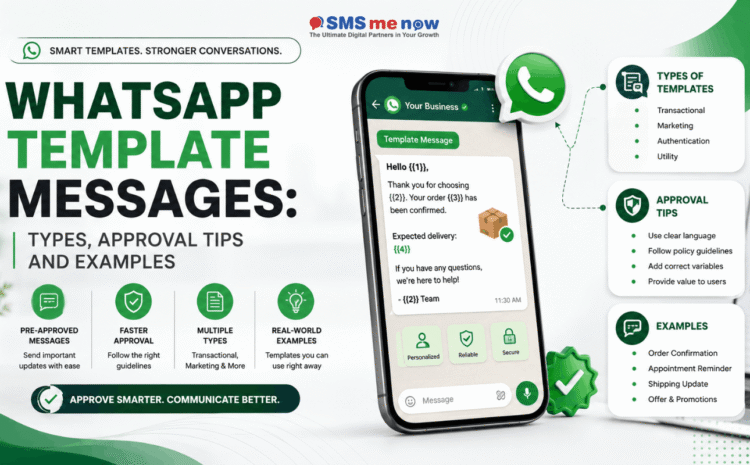
WhatsApp Template Messages: Types, Approval Tips and Examples
WhatsApp Template Messages: Types, Approval Tips and Examples
WhatsApp has become an important communication channel for businesses looking to engage customers through timely, personalized and structured messaging. For businesses using the WhatsApp Business Platform, WhatsApp Template Messages play an important role in sending approved business communications.
Templates are particularly useful for order updates, appointment reminders, authentication codes, promotional campaigns and other business notifications.
However, creating a WhatsApp message template is not simply about writing a message and sending it to customers. Businesses need to select the correct category, follow WhatsApp’s content requirements and maintain message quality after approval.
According to Meta’s current documentation, WhatsApp templates are categorized into three primary categories: Marketing, Utility and Authentication.
Understanding these categories and following the right approval practices can help businesses create effective WhatsApp campaigns while maintaining a better customer experience.
What Are WhatsApp Template Messages?
A WhatsApp Template Message is a predefined message format created by a business for use through the WhatsApp Business Platform.
Businesses can create templates containing fixed content along with dynamic fields that personalize the message for individual customers.
For example:
“Hello {{1}}, your order {{2}} has been successfully confirmed.”
Here:
- {{1}} can represent the customer’s name.
- {{2}} can represent the order number.
Templates can contain four primary components:
- Header
- Body
- Footer
- Buttons
Depending on the template configuration, businesses can also use supported media and interactive actions.
This structure allows companies to automate communication while still providing relevant information to individual customers.
Main Types of WhatsApp Template Messages
Choosing the correct template category is one of the most important steps during template creation.
WhatsApp currently divides templates into three main categories.
1. Marketing Templates
Marketing templates are used for promotional or commercial communication.
Businesses may use them for:
- Product launches
- Special offers
- Seasonal campaigns
- New service promotions
- Customer re-engagement
- Product recommendations
- Event promotions
- Discounts and offers
Simple Example
“Hello {{1}}, our festive offer is now available. Explore special savings on selected products until {{2}}.”
CTA: View Offer
Marketing templates should clearly communicate the purpose of the promotion and should be sent to an appropriate audience.
2. Utility Templates
Utility templates are typically related to a customer’s existing transaction, request or service activity.
Meta describes utility templates as messages generally triggered by a user action or request, such as an order confirmation or transaction update.
Common uses include:
- Order confirmations
- Shipping notifications
- Appointment reminders
- Payment updates
- Booking confirmations
- Service notifications
- Account-related updates
- Subscription reminders
Simple Example
“Hello {{1}}, your appointment is confirmed for {{2}} at {{3}}.”
CTA: View Appointment
Utility messages should primarily provide useful transactional information rather than introduce unrelated promotional offers.
3. Authentication Templates
Authentication templates are specifically designed for identity verification and authentication.
They are commonly used for:
- OTP verification
- Login authentication
- Account registration
- Password recovery
- Identity verification
WhatsApp provides dedicated authentication-template functionality for verification codes and supported authentication experiences.
Simple Example
“Your verification code is {{1}}.”
Authentication templates generally follow a more standardized structure because their primary purpose is security and account verification.
How WhatsApp Template Approval Works
When a business creates a new template, it is submitted for review.
Meta states that template submissions are validated using a combination of automated systems and manual review.
The review process evaluates factors such as:
- Selected template category
- Message purpose
- Content
- Variables
- Formatting
- Compliance with platform requirements
After review, the template may receive an approved or rejected status.
Selecting the correct category is especially important because WhatsApp validates whether the submitted category matches the actual purpose of the template.
Tips to Improve WhatsApp Template Approval
1. Choose the Correct Category
The content of the template should clearly match Marketing, Utility or Authentication.
For example:
Utility:
“Your order {{1}} has been dispatched.”
Marketing:
“Get 20% off your next order this weekend.”
Trying to place promotional content inside a utility template can create categorization problems.
2. Keep the Message Purpose Clear
Customers should immediately understand why they are receiving the message.
Avoid vague wording such as:
“We have an important update for you.”
Instead use:
“Your appointment scheduled for {{1}} has been confirmed.”
Specific communication improves clarity for both customers and template review.
3. Use Variables Properly
Variables should represent useful customer-specific information such as:
- Customer name
- Order number
- Appointment date
- Payment amount
- Booking ID
- Delivery date
When templates contain variables, Meta requires appropriate sample information during template creation so the intended structure can be evaluated.
Avoid adding unnecessary variables simply to make the message appear highly personalized.
4. Avoid Mixing Marketing and Utility Content
One of the common mistakes businesses make is adding promotional content to transactional notifications.
For example:
Better Utility Message:
“Your order {{1}} has been delivered successfully.”
Avoid:
“Your order {{1}} has been delivered. Buy again today and receive 25% off.”
The promotional offer changes the purpose of the message.
5. Use Relevant Call-to-Action Buttons
Buttons should support the purpose of the message.
Useful examples include:
Order Message
- Track Order
Appointment Message
- Confirm
- Reschedule
Marketing Message
- View Offer
- Shop Now
Avoid adding unrelated calls to action that create confusion.
6. Keep Templates Concise
WhatsApp is a conversational platform, so messages should be easy to scan.
A good template should generally answer:
- Who is contacting the customer?
- Why is the message being sent?
- What does the customer need to know?
- What action should the customer take?
Do not fill a template with unnecessary promotional paragraphs.
7. Check Grammar and Formatting
Before submitting a template, review:
- Grammar
- Spelling
- Variable placement
- Capitalization
- Dates
- Links
- Button labels
Professional formatting improves readability and reduces customer confusion.
Common Reasons for WhatsApp Template Rejection
Templates may face approval problems for several reasons, including:
- Incorrect template category
- Unclear message purpose
- Poorly structured variables
- Content that does not match the selected category
- Problematic formatting
- Content that conflicts with WhatsApp policies
Meta’s categorization system can reject templates where the designated category does not match the actual content.
If a template is rejected, businesses should review the reason, correct the relevant issue and submit the revised version rather than repeatedly submitting identical content.
Approval Is Not the End: Template Quality Matters
Receiving template approval does not mean businesses should send the message without considering customer experience.
Template quality and user feedback remain important after approval.
Templates can be paused or disabled when quality issues occur, which can prevent businesses from continuing to send them.
Businesses should therefore monitor:
- Customer responses
- Message relevance
- Opt-outs
- Negative feedback
- Campaign performance
- Message frequency
Sending fewer but more relevant messages is usually better than repeatedly contacting customers without a clear purpose.
Best Practices for WhatsApp Template Messages
For a better messaging experience:
- Send messages to relevant audiences.
- Maintain appropriate customer consent.
- Choose the correct template category.
- Keep copy clear and concise.
- Personalize messages only where useful.
- Use meaningful call-to-action buttons.
- Avoid excessive promotional messaging.
- Respect opt-out requests.
- Review templates before launching campaigns.
- Monitor template performance.
- Keep customer information accurate.
- Update outdated templates regularly.
A good WhatsApp template should provide value, context and a clear next action.
Frequently Asked Questions
1. What are WhatsApp Template Messages?
WhatsApp Template Messages are predefined business messages created for use through the WhatsApp Business Platform. They can contain fixed content, dynamic variables and supported interactive components.
2. What are the types of WhatsApp templates?
WhatsApp currently categorizes templates into Marketing, Utility and Authentication.
3. What is a Marketing Template?
A Marketing Template is used for promotional communication such as offers, product announcements, campaigns and customer re-engagement.
4. What is a Utility Template?
A Utility Template generally provides transactional or service-related information based on a customer’s action or request, such as an order confirmation or appointment reminder.
5. What is an Authentication Template?
Authentication Templates are designed for identity verification, including OTPs and account authentication.
6. Does WhatsApp approve every template?
No. Templates undergo review and may be rejected if they do not meet categorization or platform requirements.
7. Can WhatsApp templates contain customer names?
Yes. Variables can be used for dynamic information such as customer names, dates, order numbers and other relevant details.
8. Can WhatsApp templates contain buttons?
Yes. Supported templates can contain interactive buttons depending on their structure and purpose.
9. Why can a WhatsApp template be rejected?
Common reasons include selecting the wrong category, unclear content, improper variables, formatting issues or failure to meet WhatsApp requirements.
10. Can an approved template later be paused?
Yes. Templates can be paused or disabled because of quality-related issues or user feedback.
11. Should promotional content be added to Utility Templates?
Generally, utility messages should remain focused on the customer’s transaction or requested service. Promotional content can cause the message to be categorized as marketing.
12. How can businesses improve template performance?
Use relevant audience segmentation, clear copy, appropriate personalization, controlled message frequency and meaningful calls to action.
Conclusion
WhatsApp Template Messages allow businesses to create structured and scalable customer communication through the WhatsApp Business Platform.
The three main categories—Marketing, Utility and Authentication—serve different purposes and should be selected according to the actual intent of the message.
Businesses can improve their chances of smooth template approval by keeping messages clear, selecting the correct category, using variables properly and avoiding unnecessary promotional content.
More importantly, businesses should continue monitoring customer experience after approval. A successful WhatsApp strategy is not about sending the maximum number of messages—it is about sending useful messages to the right customer at the right time.
Need Help With WhatsApp Template Messages?
Want to use WhatsApp Business API more effectively for your business?
Book a consultation through our website to get professional assistance with:
- WhatsApp Business API setup
- Template creation and approval
- Marketing Templates
- Utility Templates
- Authentication Templates
- WhatsApp automation
- CRM integration
- Chatbot development
- Customer notifications
- Lead follow-up automation
Our team can help you build a structured WhatsApp communication system suited to your business requirements and customer journey.
Disclaimer
This blog is intended for general informational purposes only. WhatsApp Business Platform features, template categories, approval processes, quality requirements, pricing and policies may change over time.
Businesses should review the latest official Meta and WhatsApp documentation before creating templates or launching campaigns. Template approval is not guaranteed and may depend on category selection, content, account status, platform policies and ongoing quality signals.
Businesses should also follow applicable privacy, marketing, consumer-protection and data-protection requirements when communicating with customers.
For a WhatsApp Business API strategy tailored to your organization, book a consultation through our website.